
Media Partnership Approval
更新日:2026/11/24
This guide explains how to approve or deny media that have applied to partner with your program.
The dashboard is available in Japanese only. In this guide, each button and menu is shown in English followed by the Japanese label you will see on screen, for example: Media Management > Partnership Approval (メディア管理 > 提携承認).
The numbered orange markers on each screenshot match the numbered items below it.
What is Media Partnership Approval?
On this screen, you can approve, deny or permanently deny the media members that have applied to partner with your program.
- Please review each media that has applied, using the data shown on the screen.
- So that media members do not have to wait, please process applications as soon as possible.
How to approve media
Follow the steps on the actual dashboard and learn how to use this screen as you go. You can pick up the operation quickly.
Please log in before using it.
Not available in Safari.
The guide is available in Japanese only.
Interactive guide: try approving a partnership (デジタルガイド:提携承認してみる)
Step 1. Open the Partnership Approval page
From the global menu, go to Media Management > Partnership Approval (メディア管理 > 提携承認).
Step 2. Select the program
Select the program for which you want to approve partnerships. Click a program name to open the partnership approval page for that program.
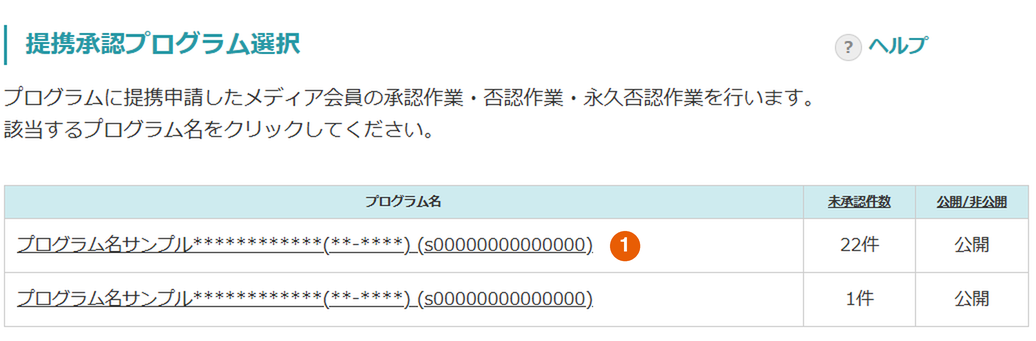
- Program name (プログラム名) – click the name of the program you want to process.
Step 3. Approve or deny the media
You can sort the list by clicking the heading of each column. For details on each column, see Column definitions.
Processing media one by one
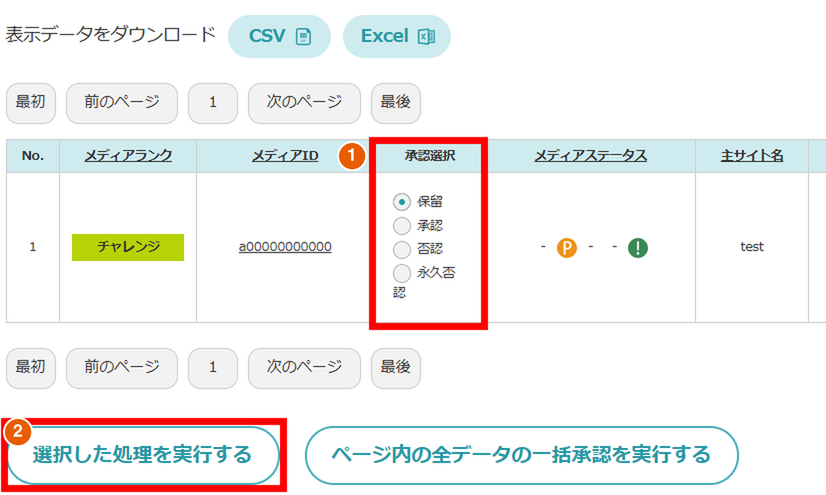
- Approval selection (承認選択) – choose the option you want for each media.
- Execute selected processing (選択した処理を実行する) – click to apply your selections.
The options in Approval selection are as follows:
| Option | What it means |
|---|---|
| Approve 承認 |
You give the media member permission to place your ads. A partnership agreement is made only after the media member is approved. From then on, the media member can place your program’s ads on their site. |
| Deny 否認 |
You do not give the media member permission to place your ads. A denied media member cannot place your program’s ads, and a denial history (否認履歴) is recorded. |
| Permanently deny 永久否認 |
You do not give the media member permission, and the media member’s applications to your program keep being denied until you cancel the permanent denial (Cancel permanent denial (永久否認 解除)). Permanently denying media without good reason may damage media members’ trust in you. Please be careful when you use this option. |
| Hold 保留 |
The default option. The application stays pending and is not processed. |
- Notes
-
- An application that stays on hold is cancelled automatically 45 days after the application date. Please process applications within 45 days.
- Process approvals and denials page by page.
- If a media member has registered a sub-site in addition to their main site, the sub-site is approved too.
- Processing applies only to the data on the displayed page. For the second page and later, move to each page and process it again.
Approving all media on the page
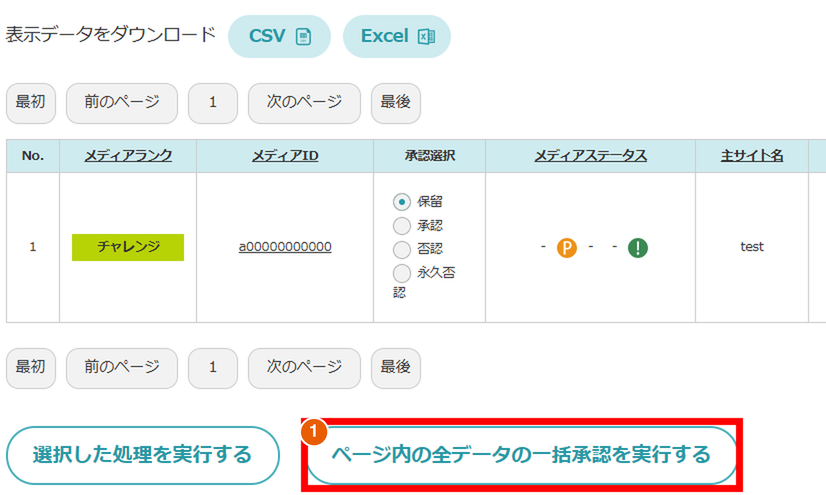
- Approve all data on this page (ページ内の全データの一括承認を実行する) – click to approve every media on the page, regardless of the options selected in Approval selection.
When you approve or deny (including permanently deny) a media, the result is automatically sent to the media member by email. You can check and change the email text under Content Management > Mail Template Management (コンテンツ管理 > メールテンプレート管理).
Column definitions
| Column | Description |
|---|---|
| Media rank メディアランク |
For details on media ranks, see What is a media rank? (Japanese). |
| Media ID メディアID |
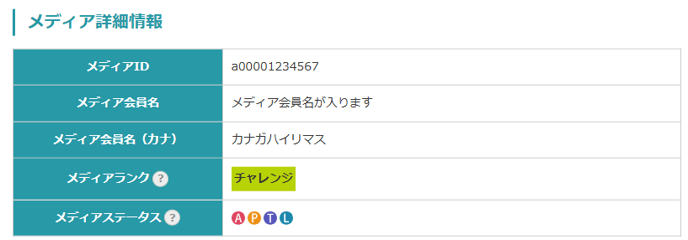
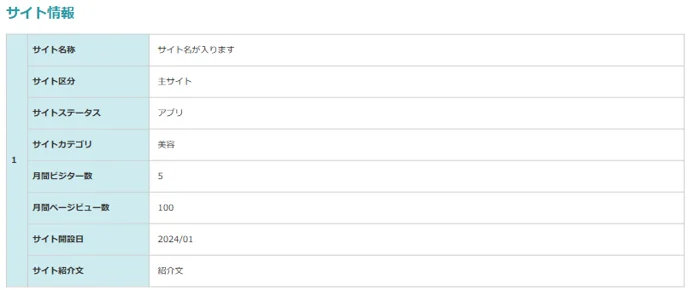
The ID that identifies the media member. Click a media ID to see the media member’s details (see the screenshots below). Monthly visitors and monthly page views are figures reported by the media members themselves. If the media member has registered a sub-site in addition to their main site, the sub-site’s information is also shown. When you approve the media, the sub-site is approved too. |
| Section 区分 |
Shows whether the media member is an individual or a corporation. |
| Media status メディアステータス |
For details on media status, see What is media status? (Japanese). |
| Main site name 主サイト名 |
The name of the main site of the media that applied. Click it to open the site. |
| Appeal site アピールサイト |
The site the media selected to present to you when applying for the partnership. Click it to open the site. When you approve the media, its sites other than the appeal site are approved too. |
| Appeal site category アピールサイトのカテゴリ |
The category of the media’s appeal site. |
| Traffic sources 集客方法 |
The ways the media said it attracts visitors when it applied. Click it to see the details. Please note that A8.net does not guarantee the accuracy or the actual state of what the media reported. |
| Promotion method 紹介方法 |
The way the media said it will promote your program when it applied. Please note that A8.net does not guarantee the accuracy or the actual state of what the media reported. |
| Application date 申込日 |
The date the media applied for the partnership. |
| Termination history 解除履歴 |
The number of times you (the advertiser) have terminated a partnership with this media member. If the media member terminated the partnership, no history is recorded. It is counted per account. Click the number to see the details. |
| Denial history 否認履歴 |
The number of times you have denied this media member’s application to this program in the past. It is counted per account. Click the number to see the details. If the termination history column is blank, the partnership was terminated by the media member. |
Media details screens (shown when you click a media ID):
If you use automatic approval
With automatic approval, basically all media are approved automatically, and Immediate partnership (即時提携) is shown on the media side. There may be some exceptions.
To change the partnership approval method, please use the request form: Change the media partnership approval method (メディア提携承認方法の変更).
- Notes
-
- Even if you use automatic approval, an application first appears on this screen as pending when the media member applies. Automatic approval runs every few minutes. When it runs, the media is approved and disappears from this screen.
- Even if you use automatic approval, media that you have once terminated or denied, and media with a media site flag (T site, P site or L site), are not approved automatically. They stay pending.