
Media Search
更新日:2026/11/24
This guide explains how to search the media that are partnered with your program.
The dashboard is available in Japanese only. In this guide, each button and menu is shown in English followed by the Japanese label you will see on screen, for example: Media Management > Media Search (メディア管理 > メディア検索).
The numbered orange markers on each screenshot match the numbered items below it.
What is Media Search?
You can search the media that are partnered with your program by purpose, using conditions such as the site name of the media member, the media ID or the media category.
- Search results are shown per registered site.
- If a media member has registered several sites, you can choose whether to include sub-sites in the search.
- If you search without any conditions, all partnered media members are shown.
- If many media match your conditions, it may take some time to display the results.
- The order of the media in the results may differ from the old dashboard.
How to search media
Step 1. Open the Media Search page
From the global menu, go to Media Management > Media Search (メディア管理 > メディア検索).
Step 2. Select the search conditions and click Search
Select the conditions you want to use to narrow down the media, and then click Search (検索).
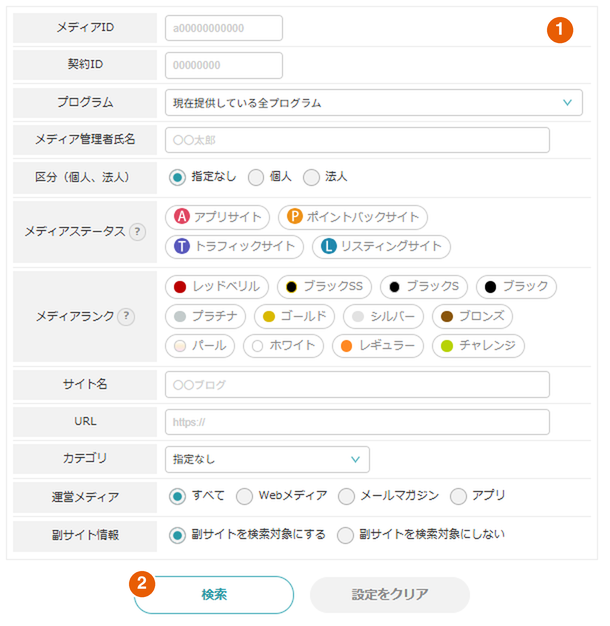
- Search conditions – enter or select the conditions to narrow down the media. For the list of fields, see Search fields.
- Search (検索) – click to run the search.
Step 3. Check the search results

For details on each column, see Search results.
Search fields
| Field | Options / input |
|---|---|
| Media ID メディアID |
Enter the media ID. |
| Contract ID 契約ID |
Enter the contract ID. |
| Program プログラム |
Select a program. The default is All programs currently offered (現在提供している全プログラム). |
| Media administrator name メディア管理者氏名 |
Enter the name of the media administrator. |
| Section (individual or corporation) 区分(個人、法人) |
Any (指定なし) / Individual (個人) / Corporation (法人) |
| Media status メディアステータス |
App site (アプリサイト) / Point-back site (ポイントバックサイト) / Traffic site (トラフィックサイト) / Listing site (リスティングサイト) For details, see What is media status? (Japanese). |
| Media rank メディアランク |
Red Beryl (レッドベリル) / Black SS (ブラックSS) / Black S (ブラックS) / Black (ブラック) / Platinum (プラチナ) / Gold (ゴールド) / Silver (シルバー) / Bronze (ブロンズ) / Pearl (パール) / White (ホワイト) / Regular (レギュラー) / Challenge (チャレンジ) For details, see What is media rank? (Japanese). |
| Site name サイト名 |
Enter the site name. |
| URL URL |
Enter the site URL. |
| Category カテゴリ |
Select a category. The default is Any (指定なし). |
| Media type 運営メディア |
All (すべて) / Web media (Webメディア) / Email newsletter (メールマガジン) / App (アプリ) |
| Sub-site information 副サイト情報 |
Include sub-sites in the search (副サイトを検索対象にする) / Do not include sub-sites in the search (副サイトを検索対象にしない) |
You can clear all the conditions with Clear settings (設定をクリア).
Search results
| Column | Description |
|---|---|
| Media ID メディアID |
Click a media ID to see the media member’s details (see the screenshots below). |
| Site name サイト名 |
Click the site name to open the site and check it. |
| Section 区分 |
Shows whether the media member is an individual or a corporation. |
| Media status メディアステータス |
For details, see What is media status? (Japanese). |
| Media type 運営メディア |
One of Web media (Webメディア), Email newsletter (メールマガジン) or App (アプリ). |
| Category カテゴリ |
The category of the site. |
Media details screens (shown when you click a media ID):
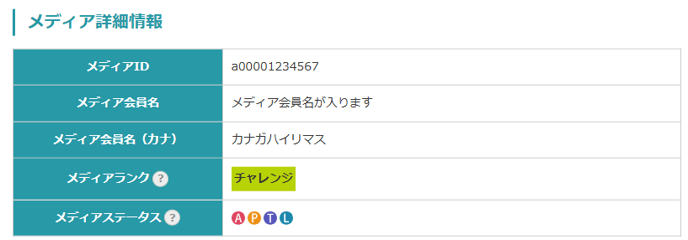
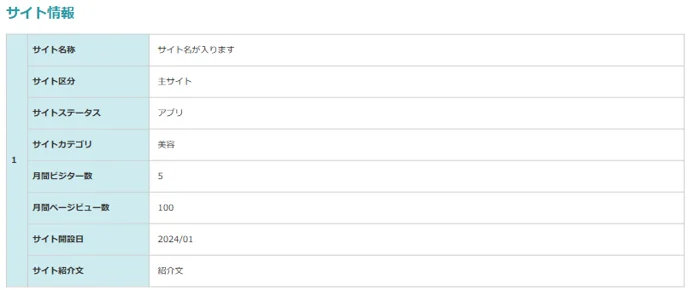
For media rank, see What is media rank? (Japanese). For media status, see What is media status? (Japanese).